Sharing QR codes safely: security notes, reports and privacy
Keep trustworthy destinations, account verification, content review and data notes separate. No tracking cookies still does not mean no data processing at all.
Key takeaways
- A QR code and a logo offer no guarantee that the destination content is genuine.
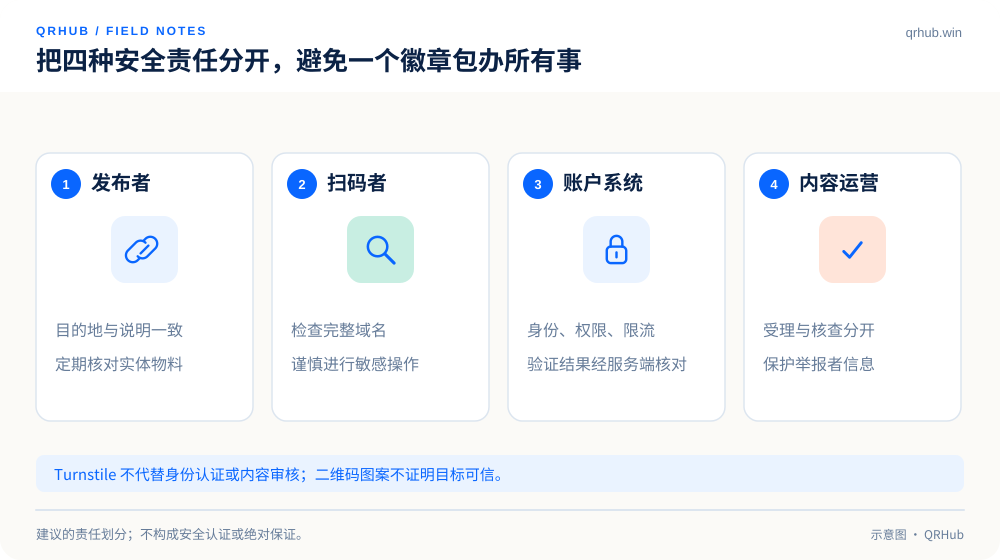
- Account security checks and content review carry different responsibilities.
- Acknowledging a report is not a finding of abuse; updates should state the status clearly and protect the reporter.
QR codes make sharing easy, and they also make it harder to read the full address before tapping. A familiar-looking logo, or a small square stuck up in a real store, cannot by itself prove that a destination is trustworthy. Building a sharing experience people can trust means thinking about the publisher, the scanner, the account system and the feedback process at the same time, not just putting a shield icon on a page.
This article offers security practice advice for using and running QRHub. It is not a security certification of any website, and it does not replace a real risk assessment of your own systems.
01 After the scan, look at where it goes
The US FTC has warned that scammers can hide harmful links inside QR codes and lure people in by covering an existing code or dressing a notice up as something official. Check the address the phone previews, and do not skip the domain and the following page just because a familiar mark is on display.[1]
For a QRHub-branded entry point, check the full host name rather than looking only for the letters qrhub.win somewhere in the address. The example qrhub.win.fake.invalid is an invalid domain used to make a point, and it does not belong to qrhub.win. When a password, a payment or an important account action is involved, the safer route is to start from an official entry point you have confirmed yourself.
Publishers can reduce the doubt as well: print the brand name, the purpose and a readable address next to the code; keep the landing page using the same brand identity; and do not follow “view the menu” with a sudden request for an unrelated account password.
02 Protect the entry point and maintain the physical material
Checking online does not replace checking on site. QR codes in stores, on display boards and in public places need a regular look for unexplained stickers, alterations or damage. When something looks doubtful, take the material down or pause it first and check the records afterwards; do not leave users to find out by trial and error.
Changing a destination in the backend affects a lot of people at once, so limit who can do it, record who made the change and when, and keep what you need to roll it back. A shared account saves trouble until you have to trace something; work from roles and responsibilities instead of making every member the same administrator.
03 Turnstile does not solve every security problem
Cloudflare Turnstile exists to judge and limit automated abuse; it does not replace account authentication, permission checks or content review. A widget showing success is one step in a flow, and the server still has to verify the token with Siteverify. The official documentation states that a token is valid for 300 seconds and can be used once, and that front-end state must not be trusted on its own.[2]
In the design, give clear feedback for waiting, verifying, success, expiry and failure. When a token expires, keep the non-sensitive form content the user has already typed and ask them to verify again; do not describe a network error as “your account is not secure”. A Secret Key belongs on the server only, never in a public page or a press kit.
Verification emails and security notices should be restrained as well: state what triggered them and how long they last, and never ask the user to send a code back to support. A real security flow cannot be left to depend on users spotting a lavish email.
04 A report entry point has to say what happens next
When a report arrives, acknowledge it first and give a trackable reference. After that, distinguish between under review, more information needed, action taken and not enough evidence found. Acknowledging is only the start; it should not immediately announce to either the reporter or the reported party that abuse has been established.
Ask for the minimum needed: the QR code or link concerned, the category of the problem, when it happened and a screenshot that shows the issue. Screenshots should mask personal information that is not needed; never ask for a password, a one-time code, a full card number or an API key. Reviewers need evidence and context, not more secrets.
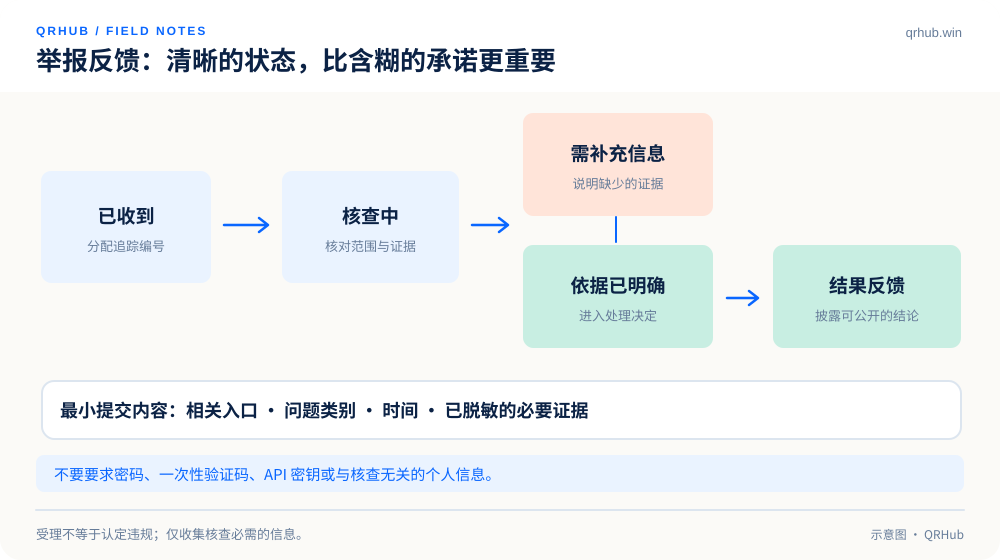
| State | What to say | What not to imply |
|---|---|---|
| Received | A reference, a summary of what was submitted and where to follow up | That abuse has been established |
| Under review | What is being checked and what further information would help | That a specific action will certainly be taken |
| Action taken | What was done, as far as it can be disclosed | A safety guarantee for every future visit |
| No action taken | An explanation that there is not enough evidence or that the conditions are not met | That the reporter acted in bad faith, or that the problem never existed |
05 No tracking cookies does not mean zero data processing
If a site carries no advertising or behavioral tracking cookies, it can reasonably skip a marketing cookie banner unrelated to what it actually does. Account services, security verification, necessary logs and the support tickets a user submits can still involve data processing, and a privacy notice should be written to match the real implementation.
Cloudflare’s Turnstile privacy addendum lists the client signals used for security decisions, including IP address and User-Agent. Turning the service on therefore cannot be advertised as “no information processed at all”. In the same way, showing data in aggregate does not make the original collection disappear.[3]
A public explanation should answer what information is used for which task, who can access it, how long it is kept and how to reach the operator. Where specific legal obligations are involved, the operator has to check them for the regions that apply; this article does not make an automatic compliance determination.
06 Build trust with clear feedback
A trustworthy experience is usually made of small things: the right domain, a clear action, a configuration you can undo, appropriate permissions and a feedback reference you can track. No badge can stand in for those processes.
For scanners: stay a little skeptical and check where a code goes. For publishers: check the material and the links regularly. For the platform: log changes, control permissions and handle feedback properly. Setting those responsibilities out clearly is worth more than slogans about being “completely safe” or “never expiring”.
Sources and further reading
- FTC, Scammers hide harmful links in QR codes to steal your information. https://consumer.ftc.gov/consumer-alerts/2023/12/scammers-hide-harmful-links-qr-codes-steal-your-information
- Cloudflare, server-side token validation, consulted 2026-10-07. https://developers.cloudflare.com/turnstile/get-started/server-side-validation/
- Cloudflare, Turnstile Privacy Addendum, consulted 2026-10-07. https://www.cloudflare.com/turnstile-privacy-policy/
Related reading