Make product packaging an entry point: guides, after-sales and print checks
Start from the real questions someone has when they open the box, organize the destinations, and check size, material and long-term maintenance before production.
Key takeaways
- A packaging code should solve a usage question first; do not send everyone back to the brand homepage.
- Size follows from the module count, the material and the distance; no single value suits every situation.
- Codes inside illustrative artwork are not for print and must be replaced by a real, generated and tested business code.
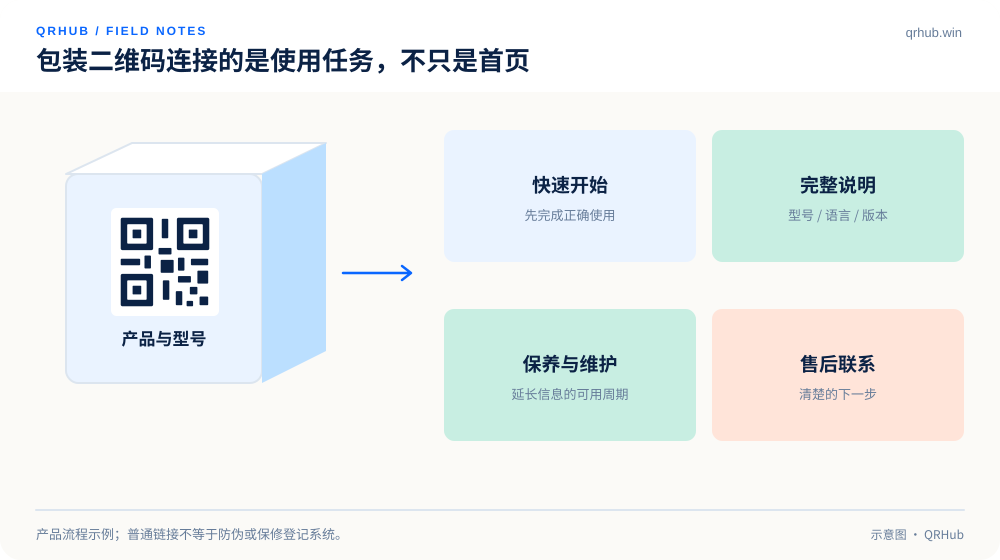
A QR code on packaging can connect setup instructions, care advice, specifications and after-sales support. But if scanning lands on an ordinary homepage and the user has to search for the product again, the touchpoint has been wasted. Start the design from the first question after the box is opened: how do I use this, where do I download the manual, and who do I contact if something goes wrong?
This article sets out a checking method for packaging and print delivery. The size example is there to explain the calculation, not as a recommended minimum for every product.
01 Start from the product identity and the user task
Different products from one brand should not make people identify the model again from a thumbnail. Build a stable information page for the product line and let the model and the language lead into the specific content. Whether you need to go as far as a serial number is a business decision; do not add personalized tracking to every package just to look advanced.
A guide page should show the product name, the applicable models and the version first, then offer a quick start, the full manual, care advice and the after-sales entry point. Keep the copy next to the code consistent too, for example “see the guide for this model”. Do not say “get the manual” and then ask for information that has nothing to do with downloading it.
02 A QR code cannot prove authenticity on its own
The pattern of a public QR code can be copied. Even when it points at a brand website, being able to open that site does not prove the product in your hand is genuine. If the business genuinely needs anti-counterfeiting, design the issuing, verification, reuse handling and customer-service review as separate mechanisms; an ordinary website link is not an anti-counterfeit system.
In the same way, opening an after-sales page does not by itself register a warranty. Describing “opened the page”, “submitted the details” and “confirmed as received” as three separate things keeps customers and support staff from disagreeing about the state of a claim.
03 Print size follows from the modules and the finished environment
The version and the content of a QR code affect how many modules it has. In DENSO WAVE’s documentation, a standard QR Code starts at 21×21 modules and rising versions add more modules; at the same physical size, the denser the code, the smaller each module.[1]
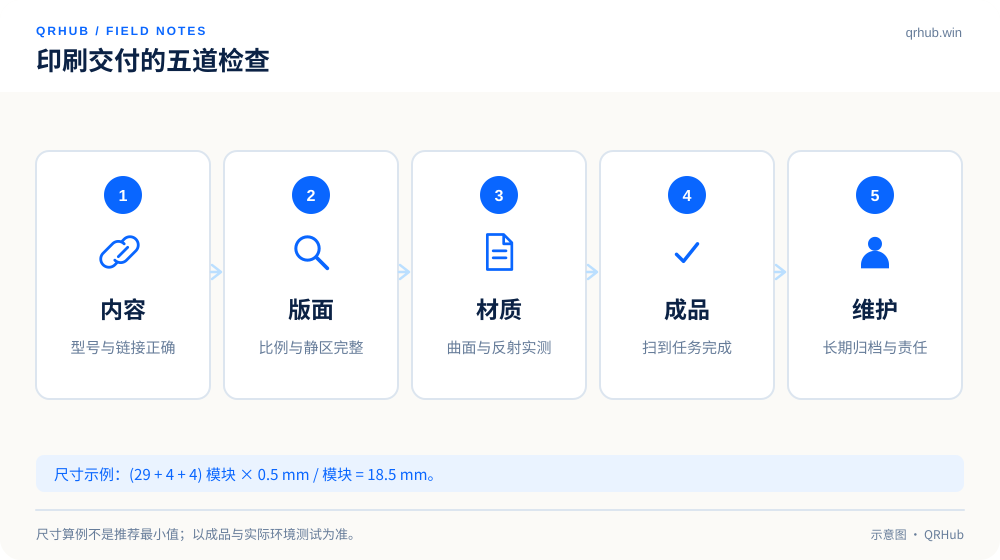
The edge length including the quiet zone can be worked out as the module count plus the quiet zone on both sides, multiplied by the module size. For example, a 29×29 module code with a 4-module quiet zone on every side and a 0.5 mm module gives a total edge of (29 + 8) × 0.5 = 18.5 mm. The 0.5 mm here is a demonstration assumption, not a universal minimum.[2]
The real size still has to account for scanning distance, the camera, print precision, surface reflection and curvature. A calculated figure cannot be treated as the answer for every cup sleeve, metal plaque or outdoor poster.
04 Give the designer and the printer the same source file
Keep the SVG file that was actually generated, and state the final finished size, the background color, the quiet zone and the requirement not to distort it. Do not treat a screenshot as a print source, and do not let different teams each download another version from a chat thread.
File names can carry the model, the language and the version, but should not expose customer information or internal identifiers. Deliver the QR source file and the list of destinations together, and record who confirmed the content. When a URL is swapped at short notice, the content check has to run again; replacing the file is not enough.
| Check | What to verify | The usual mistake |
|---|---|---|
| Encoding | Model, language, address and permissions | Similar models pointing at the same wrong guide |
| Layout | Quiet zone, proportions, action prompt | Cropping the margin or stretching the code to fit |
| Printing | Material, curvature, reflection and real size | Checking the screen artwork and never the finished proof |
| Lifecycle | Owner, version and where it goes when retired | Nobody owning the destination page after launch |
05 Test the proof through to the completed task
A successful scan is only the first gate. Carry on to confirm that the destination loads, the model matches, the guide is readable, the download works and the after-sales contact is right. For multilingual packaging, also confirm that people can switch to the language they need and are not stranded because the site defaults to another one.
Test on the real material, not just on plain paper. Put the sample where it will actually be used and try a normal angle and light. Keep the samples that failed and work out whether the problem is recognition, the network or the content; fix each one before going to mass production.
A QR illustration used as decoration, a sample pattern from an icon set and the small code on a design cover should never go to production as a business QR code. They are there for visual explanation, not as the real entry point to your product.
06 Keep information usable for older products too
Packaging already sold stays in the world long after a product is discontinued. The information page can mark the product status without deleting the manual straight away. Keeping clear version labels and scope notes for older models reduces the risk of someone applying a new guide to an old device.
The maintenance period for a QR code should match how long the product is used. Scheduling regular link checks, archiving and a handover of responsibility is far more practical than promising “valid forever” without confirming it. Packaging is a long-lived touchpoint, and the content behind it needs a long-term plan.
Sources and further reading
- DENSO WAVE, Information capacity and versions of QR Code. https://www.qrcode.com/en/about/version.html
- DENSO WAVE, calculating the area of a QR code with the four-module quiet zone. https://www.qrcode.com/en/howto/code.html
Related reading