Batch QR codes: turn a spreadsheet into a maintainable asset
Prepare the data, map the fields, find the failures, organize the exports. Batch creation is not just generating a lot of codes; it is keeping every row traceable afterwards.

Key takeaways
- Every row needs a stable identity; a name, a folder and a batch are three different things.
- Sample before the full run, and after a failure retry only the rows that failed.
- Deliver the QR files together with a content manifest so the mapping survives.
Once the number of QR codes grows from a handful to dozens, copying and pasting them one by one stops being reviewable. Batch creation saves repetitive work, but it also amplifies mistakes: map one address column wrongly and the error can appear across a whole print run at once. A dependable process checks the data first and keeps the row-by-row mapping alive long after delivery.
The example below uses a fictional set of product material to show how to organize the CSV, the batches and the export manifest. The field names are the data convention this article suggests; for a real import, map them to the template in your own account.
01 Start by saying what each row stands for
A row should stand for one clear QR code task — the entry point to one product’s guide, say — not a mixed cell holding several links. Give the row a stable identifier: the name is there for people to read, the identifier is there to tie systems and files together.
A name can be edited and can repeat, so it does not work as a unique identity. Folders organize the assets you already have; a batch records one generation run. Moving a QR code from a “new products” folder into an “always stocked” folder should not lose the thread of which import it came from.
| Suggested field | Example | What it is for |
|---|---|---|
| external_id | manual-001-zh | Matches an external business record and stays unique |
| name | Pour-over kettle · Chinese guide | Identifies the content in lists and file names |
| url | A full HTTPS address | The destination to encode or configure |
| batch_name | Autumn manuals, first batch | Gives one generation run a readable name |
02 Keep the CSV predictable
Save a file that contains non-ASCII text as UTF-8 and check the import preview for garbled characters. For leading zeros in product numbers, do not rely on a spreadsheet guessing the type; keep the number as text and verify it again after export. Each column should have one purpose, and notes should not sneak into the address column.
Fields containing a comma, a line break or a double quote have to be quoted correctly, and double quotes inside a field have to be escaped. Do not replace a real parser with splitting the string on commas. RFC 4180 sets out the basic conventions for this common interchange format and works well as a checklist.[1]
external_id,name,url
manual-001-zh,Pour-over kettle: Chinese guide,https://qrhub.win/?demo=manual-001-zh
manual-002-zh,Grinder: Chinese guide,https://qrhub.win/?demo=manual-002-zh
manual-003-en,Coffee scale: English guide,https://qrhub.win/?demo=manual-003-en
The addresses above only show the field structure; they do not mean those product pages exist. Before the real import, replace them with genuine public addresses and check every item.
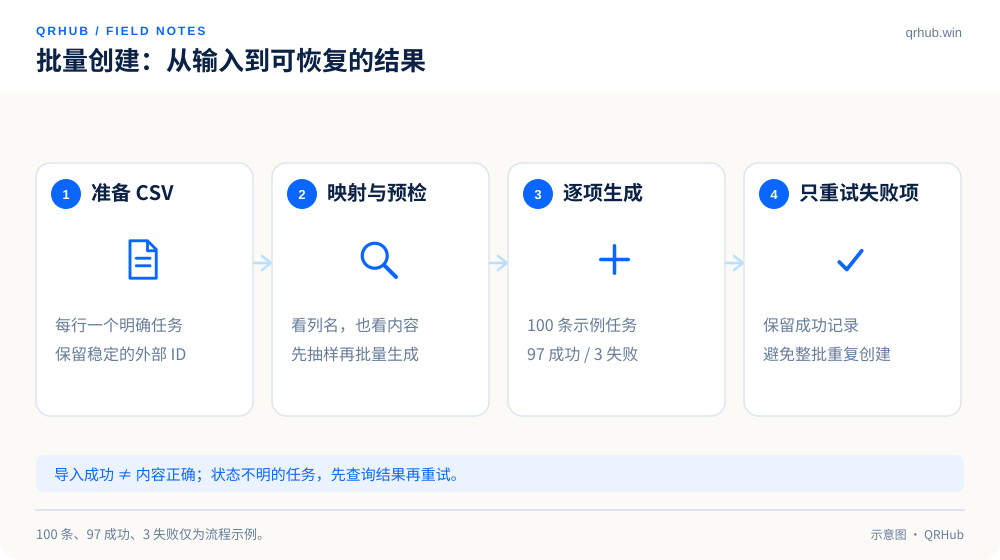
03 After mapping the fields, sample before the full run
In the mapping screen, check the column headings against the actual content rather than looking only at the first cell. Your sample should cover the first row, the last row, names that are not plain ASCII, the longest address and any special characters. If a column is called Link but actually holds image preview addresses, fix that before generating anything.
Validation should separate at least two kinds of problem: structural ones, such as an empty required field or a malformed address, and business ones, such as one product having two different destinations or a destination page that requires a sign-in. The first kind can be checked automatically; the second usually needs someone to confirm it. A successful import does not mean the business content is correct.
Generate a small sample first, check it on a phone and have the people who will actually use the material sign it off. If that has not happened, do not push the whole print run out just to save time.
04 Treat partial failure as a normal branch
Say a run has 100 rows, 97 of which succeed and 3 fail — again, a demonstration only. The result page you want keeps the status of every row and the reason each failure happened, so that you only have to fix those 3. Do not simply re-import the whole file: that is how duplicate records, duplicate exports and unreconcilable identifiers appear.
In the system, a batch identity and a per-row identity help limit duplicate creation; in the human process, keep the failure list, the time of the retry and the final result. For a task still processing or in an unknown state, look the result up before deciding whether to retry, instead of reading “no success message yet” as a failure.
05 What you export is a traceable deliverable
The archive should hold the images and a content manifest together. Name files with the stable identifier plus a short name, such as manual-001-zh.svg. The manifest records the encoded content, the destination address, the QR code ID, the batch ID and the export time, so that designers, operations people and developers can all check it against the same source.
When you export a CSV for spreadsheet software from untrusted input, consider formula injection as well. Content starting with a character such as = may be treated as a formula by the software; how to handle that has to be verified against the specific product, and wrapping everything in double quotes is not a general safety guarantee.[2]
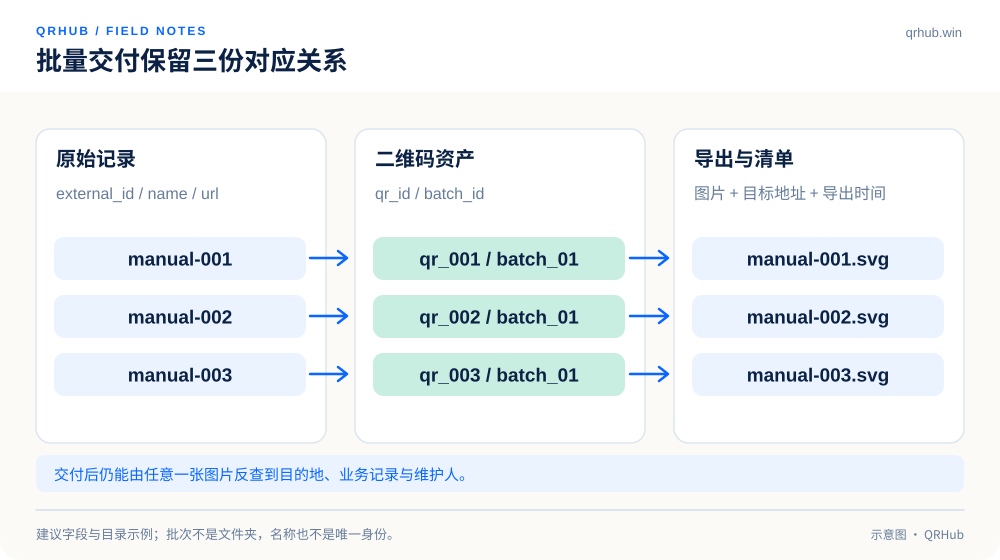
06 Make the next change easier
When the batch is finished, record who owns it, when it will be reviewed and when it will be archived. Keep the batch relationship when you edit a single code; when you delete or pause one, write down what it means for the historical numbers. A well-kept batch lets you see the whole and still open any single row to trace the original task.
What you end up with should not be a folder full of images but a set of connection assets with identities, purposes and maintenance records, so that management cost does not run away as the numbers grow.
Sources and further reading
- RFC 4180, Common Format and MIME Type for Comma-Separated Values (CSV) Files. https://www.rfc-editor.org/rfc/rfc4180
- OWASP, CSV Injection: different spreadsheet products handle it differently. https://owasp.org/www-community/attacks/CSV_Injection
Related reading